


With Split view, users can work with both visual design and html code in a single interface, eliminating the needs to go back-and-forth between views while improving productivity at the same time. WebTextEditor also automatically synchronizes the changes as user changed the editor's focus, ensuring each change is properly reflected to other views.
When Split view is enabled, all three views will be enabled even though the Design or HTML view is disabled. This behavior is implemented since Split view requires both views to be enabled.
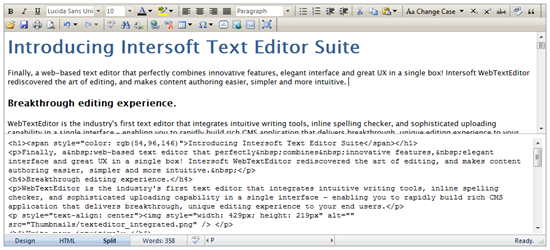
Split view enables users to intuitively work with visual design and html code at the same time.
 See Also
Other Resources
{Rich Design View}
{Adaptive HTML View}
{Preview}